Free AI Image Generator
Generate stunning images from text for free. No registration required. Perfect for artists, designers, and creators.

English
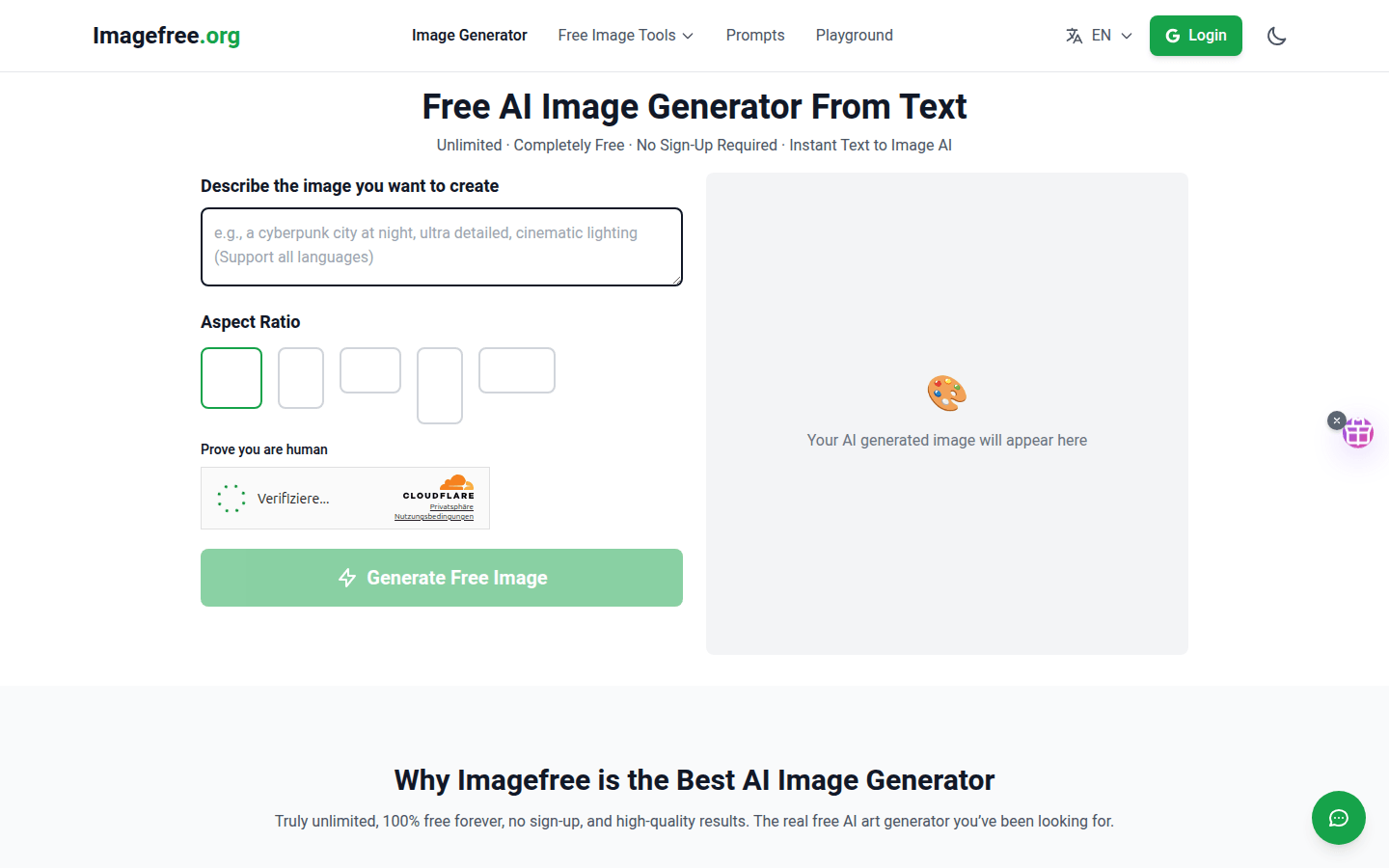
ImageFree is a free AI image generation website that users can use without registering. Its core technology is text-to-image AI generation technology, which can quickly generate corresponding images based on text input by users. The main advantages of this product include completely free to use, no registration required, fast generation, etc. In terms of background information, with the development of AI technology, the demand in the field of image generation continues to grow, and ImageFree emerged as the times require, aiming to provide users with convenient and efficient image generation services. Price-wise, the product is completely free. It is positioned to meet the needs of ordinary users, artists, designers and other people for image generation, and is suitable for multiple scenarios such as artistic creation, avatar production, and graphic design.
Demand group:
["Artists: Artists can use this product to quickly transform text inspiration into visual images, bringing new inspiration and creative direction to artistic creation with the help of rich and diverse AI generation effects, and improving creative efficiency.", "Designers: When designers are doing graphic design, interface design and other work, they can use this product to generate relevant design elements, save design time, and enrich design styles and expressions.", "Ordinary users: Ordinary users can use this product to create personalized avatars, wallpapers, etc., to meet the image needs in daily life and add fun to life.", " "Self-media creators: Self-media creators need a lot of images when producing content. This product can help them quickly generate images related to the content, improving the attractiveness and quality of the content.", "Students: Students may need some image materials during the learning process, such as making handwritten newspapers, PPT, etc., using this product can easily obtain the required images to assist learning."]
Example of usage scenario:
Artistic creation: Artists can enter a text description about a fantasy scene, such as "a castle floating in the clouds, surrounded by rainbows and birds," and use the product to generate creative works of art.
Avatar creation: Users can enter their desired avatar style and characteristics, such as "cartoon-style male avatar, blue eyes, brown hair" to generate a unique personal avatar.
Graphic design: When designers are designing posters, they can enter "technological electronic product posters with blue and silver as the main colors" to quickly obtain relevant design materials.
Product features:
Free AI image generation function: Users can enter text descriptions and the text will be converted into high-quality images through advanced AI algorithms. There is no need to pay any fees and there is no limit on the number of uses.
Background removal function: It can accurately identify the subject and background in the image and remove the background to facilitate subsequent image editing and processing and improve work efficiency.
Image enlargement function: It can enlarge low-resolution images, maintain the clarity and details of the image as much as possible while enlarging, and improve the quality of the image.
Image editing function: Provides a wealth of image editing tools, such as cropping, adjusting color, adding filters, etc., allowing users to personally modify and improve the generated images.
Prompt word playground function: Users can try different prompt words in this area, explore various possibilities of AI image generation, and inspire creative inspiration.
Multi-language support function: The website supports multiple languages, including English, Chinese, Spanish, French, etc., making it convenient for users in different regions.
User login function: Users can log in through their Google account. After logging in, they can enjoy more personalized services and functions.
Theme switching function: Users can switch the theme of the website according to their own preferences, such as light mode and dark mode, to improve the user experience.
Usage tutorial:
Step 1: Open the website http://imagefree.org/.
Step 2: Enter the text description of the image you want to generate on the image generation page.
Step 3: Click the Generate button and wait for the AI to generate the image.
Step 4: If the generated image meets the requirements, you can directly download and use it; if it does not meet the requirements, you can adjust the text description and regenerate it.
Step 5: If you need to edit the image, you can use the background removal, image enlargement, image editing and other tools provided by the website.
Step 6: If you want to switch languages, you can click the language selection button and select the language you need.
Step 7: If you want to log in to your account, you can click the login button, choose to log in with a Google account, and follow the prompts to complete the login process.