Merry Christmas AI video generator
Create festive videos in seconds with our AI Christmas video generator. Perfect for personal and business use.

English
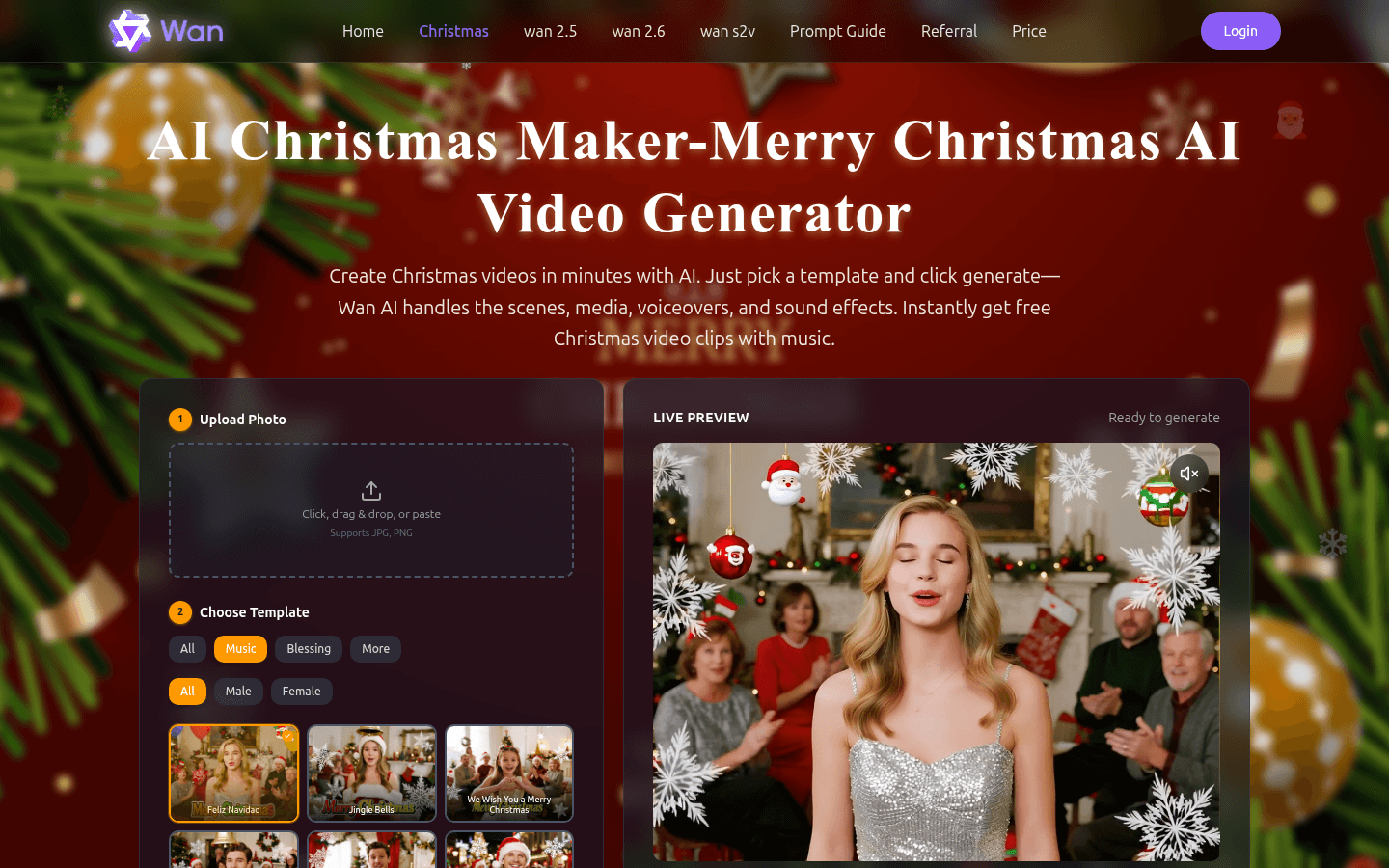
This product is an advanced AI video creation platform launched by Wan AI, focusing on Christmas video production. The importance lies in using AI technology to simplify the Christmas video creation process, allowing users to easily create personalized videos. The main advantages include simple operation, just select a template and click generate, and AI can handle the scene, media, narration and sound effects; free access to Christmas video clips with music. The product background is to meet the needs of users to quickly create beautiful videos during the Christmas period. In terms of price, it provides a free trial and is positioned as a multimedia creation tool for the public.
Demand group:
["Ordinary users: For ordinary users, who want to send unique blessings to relatives and friends during Christmas, this product is simple to operate and does not require professional video production skills to quickly produce exquisite Christmas videos and add a festive atmosphere.", "Corporate marketers: Corporate marketers can use this product to produce Christmas promotional videos, brand promotion videos, etc., attract customers through personalized video content, and increase brand awareness and product sales.", "Educators: Educators can use this product to create Christmas-themed teaching videos, such as Christmas cultural introductions, holiday activity displays, etc., to enrich teaching content and stimulate students' interest in learning."]
Example of usage scenario:
Individual users can create Christmas blessing videos for their families, upload family photos, choose warm music templates, quickly generate videos full of memories and share them with their families.
Companies produce Christmas promotional videos to showcase holiday discounts and attract consumers to purchase products.
School teachers make Christmas teaching videos to introduce Christmas culture and traditions to help students better understand the holiday.
Product features:
Transform photos into exciting videos: Users can upload their own photos, and the platform will use AI technology to intelligently integrate these photos into carefully designed video scenes, giving new life to ordinary photos and turning them into vivid and interesting video content.
Rich template selection: The platform provides a variety of templates, covering different styles, themes and music. Users can choose the most suitable one among many templates according to their own preferences and needs, laying a good foundation for video creation.
Custom audio upload: Users can not only use the audio that comes with the template, but also choose to upload their own audio files. Common formats such as MP3 and WAV are supported, and a maximum of 20MB of audio can be uploaded to meet the diverse audio needs of users.
Automatic setting of video duration: The duration of the video will be automatically set according to the length of the audio uploaded by the user. The maximum duration can be up to 600 seconds, ensuring that the rhythm of the video and the audio perfectly match, saving users the trouble of manually adjusting the duration.
Video resolution selection: Users can choose from multiple video resolutions such as 480p and 720p according to their own needs and usage scenarios to ensure that the video can present the best visual effect on different devices.
Real-time preview and sharing: After generating a video, users can preview it in real time to ensure that the video meets their expectations. If you are satisfied, you can also share the video directly to social platforms such as X to share the joy of the holiday with others.
Usage tutorial:
1. Upload photos: Click the "Upload Photo" button to upload photos in supported JPG and PNG formats by clicking, dragging, or pasting.
2. Select a template: Choose a suitable template from a variety of templates, and you can choose according to categories such as music and blessings.
3. Upload audio (optional): If you want to use custom audio, click "Upload Audio" and select an audio file in MP3 or WAV format, with a maximum size of no more than 20MB.
4. Fill in other requirements (optional): Additional requirements can be filled in, and the number of words is limited to 0-1000 words.
5. Set video parameters: automatically set the video duration according to the audio length, up to 600 seconds; select the video resolution, such as 480p, 720p.
6. Generate video: Click the "Generate" button and wait for the platform to use AI to generate the video. You can preview it in real time during the process.
7. Share the video: After successful generation, the video can be shared to social platforms such as X.