My Time Card Calculator
Calculate work hours accurately with our free Time Card Calculator. Perfect for freelancers, remote workers, and businesses.

English
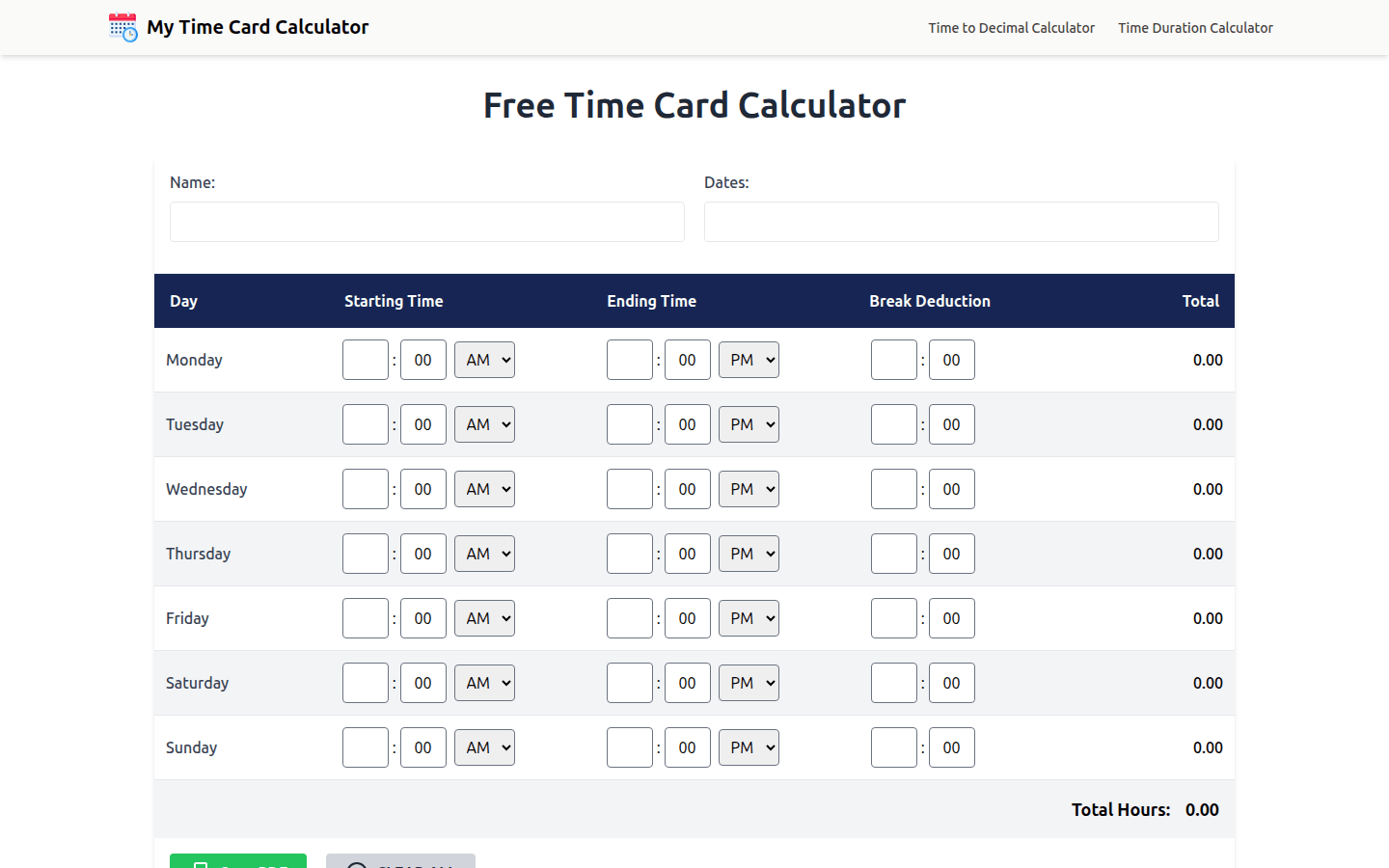
Time Card Calculator is an online working time calculation tool designed to provide convenient and accurate working time calculation services for all types of workers. Its importance lies in helping users get rid of the tediousness and errors of manual calculation of working hours, saving time and energy. Key advantages include: accurate calculations, professional and accurate handling of daily totals, weekly totals and rest deductions; simple and easy-to-use design with clear labels, intuitive input and no distractions; completely free to use, no hidden fees and locking features; good data privacy, all entries remain only in the browser and are not stored, shared or uploaded; supports multiple job types and industries. The product background is to meet the needs of different groups of people for working hours calculation, and is suitable for all types of workers, business owners, etc. In terms of price, this tool is completely free and can be used without registering an account. Its positioning is to become a simple, reliable and professional working time calculation solution.
Demand group:
["Hourly workers: For employees who are paid by the hour, this calculator can accurately calculate the weekly working hours, avoiding salary calculation errors caused by manual calculation errors. At the same time, the generated professional timesheet is convenient for submission to employers for salary settlement.", "Remote workers: Due to the unstable working location, remote workers may have difficulty recording working hours accurately. This tool can help them easily record their daily working hours and automatically calculate the total hours, making it easier to communicate with employers about their work status and obtain compensation.", "Freelancers and contractors: Freelancers and contractors need to accurately report working hours to clients for billing. The clear time records and professional PDF export functions provided by this tool help them show their work results to clients and charge reasonably.", "Self-employed people: Self-employed people need to manage their own working hours and may also need to record the working hours of their employees. This tool can help them meet the needs of both aspects and effectively improve the efficiency of working time management.", "Students and part-time workers: Students and part-time workers often work irregular hours. This tool can help them easily record working hours in different time periods to ensure accurate calculation of compensation, and also help them arrange their study and work time reasonably."]
Example of usage scenario:
Hourly employees in a company use this calculator to record weekly working hours, automatically calculate the total working hours after deducting rest time, and generate a PDF time sheet to submit to the company for salary settlement, avoiding manual calculation errors.
A freelancer providing services to a client uses the tool to record working hours on each project, generates a professional timesheet and sends it to the client for billing, improving work efficiency and client satisfaction.
The owner of a small business uses the calculator to manage employees' working hours to ensure that employees' working time records are accurate and facilitate payroll accounting and human resources management.
Product features:
Automatic calculation of daily and weekly working hours: Users only need to enter the start and end time of each day and the length of breaks, and the calculator will automatically and accurately calculate the total daily and weekly working hours, without the need to manually perform complex mathematical operations, greatly improving calculation efficiency and accuracy.
Deduction of rest time: Users can input the length of lunch breaks or unpaid breaks, and the calculator will automatically deduct the corresponding rest time from the total working hours to ensure that the calculation results truly reflect the actual working hours.
Supports long shifts and night shifts: For shifts with long working hours or across midnight, such as night shifts from 10 pm to 6 am, this tool can correctly calculate the working hours to meet the needs of different working modes.
Clear weekly overview: Provides a clear overview of weekly working hours, allowing users to view and review the distribution of weekly working hours at any time, making it easier to manage and adjust working hours.
Professional PDF export: A professional and easy-to-read PDF timesheet can be generated. The timesheet contains information such as work date, start and end time, rest deduction, daily total time, weekly summary, etc. It is suitable for submission to the human resources department, sending to customers, or for personal record keeping.
Prevent mathematical errors: Through automated calculations, mathematical errors that may occur in manual calculations can be effectively avoided to ensure the accuracy and reliability of working hours calculations.
Real-time calculation and adjustment: All calculations are performed in real time. Users can check the impact on the total working hours after adjusting the input information at any time, which facilitates timely data correction and adjustment.
Multi-device support: This tool runs based on the browser and can be used on multiple devices such as desktop computers, tablets, and mobile phones, making it convenient for users to calculate and manage working hours anytime and anywhere.
Usage tutorial:
Step 1: Open the Time Card Calculator website.
Step 2: Enter the start and end times for each day of the week.
Step 3: If there are any unpaid breaks, enter the corresponding break lengths.
Step 4: The calculator will automatically display the total daily hours and total weekly hours.
Step 5: View and adjust the entered entries at any time, and observe the impact of adjustments on the total working hours in real time.
Step 6: After confirming that the calculation results are correct, you can choose to download or print the formatted timesheet.